hacking a chinese photo frame
-
 James McFarland
 - 18 May, 2026
-
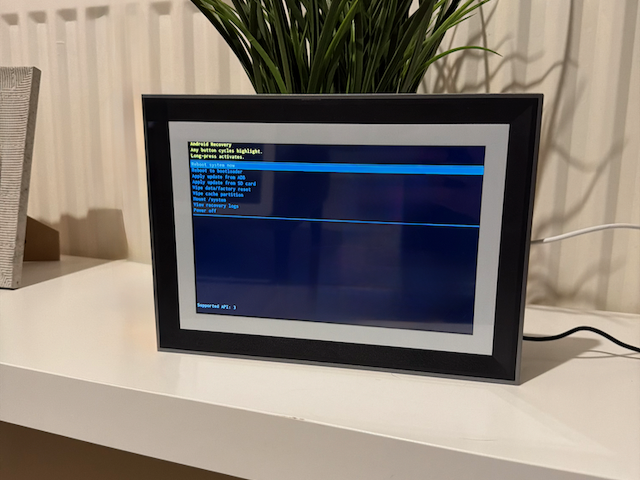
I was gifted a Chinese digital photo frame.
As gifts go, this was excellent, because it was also obviously a bit cursed.
On paper it was a modern-ish Wi-Fi photo frame. In practice it turned out to be an elderly Android tablet in costume: thin OEM shell, deeply stale software stack, mystery vendor apps, and exactly the sort of vibes you do not want from something that wants network access in your house.
That is usually the fork in the road with hardware like this. Either it is annoyingly locked down, or it is barely held together and unexpectedly cooperative. Thankfully, this one was the second kind.
The end result is better than I expected going in. The OEM apps are disabled, the frame now boots into a custom launcher, and that launcher points at a tiny local web service which proxies and prepares images from Immich (a self hosted iCloud/Google Photos alternative) for display. It is no longer a “smart frame” in the vendor sense. It is now a single-purpose display terminal that happens to live inside a photo-frame enclosure.
Note
This post was written with the assistance of generative AI.
Warning
This was not a story about making an old Android device secure. It was a story about reducing how much trust the device needed. The frame still runs ancient software, so the win here is containment, minimised exposure, and a much narrower job description.
The basic problem
The device identified itself as a P105, manufactured by ZED, running Android 6.0.1 with a 2016-07-05 security patch level. At the same time, the build date was from May 2024.
That combination is exactly as dubious as it sounds. In practice it usually means an ancient Android userspace, an ancient kernel branch, a vendor rebuild recent enough to keep shipping units, and very little interest in long-term software quality or security. Under the skin, the frame was a Rockchip RK3126 device in the rk312x family, with a 32-bit ARMv7 userspace, permissive SELinux, and a very old Android 6 board support package.
In other words: not modern, not trustworthy, but probably hackable.
- What it was
- Why I was suspicious
- Goal
- Wi-Fi photo frame
- Actually an Android 6 Rockchip tablet
- OEM launcher at
com.waophoto.smartframe - Update-related packages including
com.adups.fota
- Android
6.0.1with a2016-07-05patch level - 2024 build date on top of that ancient base
- Permissive SELinux
- Unknown vendor software stack with network-facing behaviour
- Keep the hardware
- Remove reliance on the OEM ecosystem
- Avoid putting secrets on the frame
- Make it do one boring job reliably
- Wi-Fi photo frame
- Actually an Android 6 Rockchip tablet
- OEM launcher at
com.waophoto.smartframe - Update-related packages including
com.adups.fota
- Android
6.0.1with a2016-07-05patch level - 2024 build date on top of that ancient base
- Permissive SELinux
- Unknown vendor software stack with network-facing behaviour
- Keep the hardware
- Remove reliance on the OEM ecosystem
- Avoid putting secrets on the frame
- Make it do one boring job reliably
The first good sign: ADB was already there
The first question was whether this was a locked appliance or just a generic Android system wearing a photo-frame costume.
It did not take long to answer. USB ADB was available immediately, and once I had a shell it became clear that the frame was much closer to “low-end tablet with a custom launcher” than “sealed embedded appliance”.
Even better, su was present and working:
adb shell whoami
adb shell su -c whoami
That is the sort of result that changes the whole shape of a project. Without root, you are negotiating with a device. With root, you are mostly deciding how patient you want to be.
Wireless ADB was also possible, which made iteration much less annoying once the initial access work was done.
Mapping the weirdness before breaking anything
Once I knew I had shell access and root, the next step was not “start ripping things out”. It was “work out what kind of weird machine this actually is before I brick it for no reason”.
The OEM experience lived in com.waophoto.smartframe, installed as a system app and acting as the default HOME launcher. There were also update-related packages like com.adups.fota and android.rockchip.update.service, which is exactly the sort of thing I do not want running on an old opaque device sitting on my network.
Still, the frame was not trapped in irreversible kiosk mode. Standard Android Settings could be opened over ADB, other apps could be installed, and the launcher behaviour was ordinary enough that it could be replaced cleanly.
That shaped the first phase of the project:
- Identify the platform properly.
- Pull backups of anything I might regret losing.
- Confirm what recovery options actually existed.
- Only then start disabling the OEM layer.
That caution mattered because old Android appliances are often weird in exactly the wrong ways. Standard assumptions do not always hold. In this case, adb reboot bootloader dropped the frame into a Rockchip-style low-level mode rather than a clean normal fastboot workflow. Useful to know, not something I wanted to trust as my primary recovery path.
The alternate firmware route was tempting
Before committing to “leave the stock Android install in place and work around it”, I did spend some time testing whether a more dramatic route was realistic. That mostly meant answering three questions:
- Is there a real recovery environment?
- Is fastboot usable?
- If not, is there at least a vendor-specific loader mode as a last resort?
The answers turned out to be yes, sort of but not really, and yes in a very Rockchip way.
adb reboot recovery brought the frame into a genuine Android recovery screen with options like Apply update from ADB, Apply update from SD card, Mount /system, and View recovery logs. That was encouraging.
Unfortunately, the hardware then reminded me what sort of device this was. The frame effectively only had one useful physical button, and recovery navigation with it was flaky enough to be borderline unusable. Tiny presses often acted like selections, which meant recovery was more “good to know this exists if things go badly wrong” than “excellent, I can iterate here comfortably”.
Fastboot was even more awkward. In one state the device would enumerate in a fastboot-like way; in another it would appear as a Rockchip USB device with 2207:310d, which is much more suggestive of a vendor loader path than a friendly Android flashing workflow. Even when fastboot devices showed something, meaningful commands mostly just hung.
That is a useful lesson with old embedded Android hardware: seeing a device in fastboot devices does not mean you have a practical flashing workflow. Sometimes it just means you have found another half-working interface.
So yes, the alternate firmware path was explored. Recovery mode was real. Low-level modes were real. But none of them looked clean or robust enough to justify making them the main plan when ADB plus root in normal Android was already working.
Replacing the OEM layer
The easiest first win was to install a proper launcher and a couple of tools so the frame stopped behaving like a captive appliance.
Nova Launcher installed cleanly. So did Firefox, Fully Kiosk Browser, and a small navigation overlay utility to compensate for the ROM’s slightly bizarre navigation situation.
Once a replacement HOME experience was proven to work, I disabled the OEM launcher, the update services, and a couple of factory-test packages rather than deleting anything outright. That became the general rule for the whole project: do the reversible thing first.
On low-end Android hardware, “I can remove it later” is usually much wiser than “I should rip it out immediately”.
Tip
The safest kind of hacking on junk hardware is usually subtractive. Disable first. Observe. Keep your recovery options. Treat irreversible changes like a late-game optimisation, not a starting move.
The obvious solution that was not actually the right one
At first, Fully Kiosk Browser looked like the cleanest finish. Conceptually it fit the problem well: fullscreen, single URL, kiosk-oriented, and easy enough to configure.
I inspected its config, used its supported import mechanism to push settings to the device, and got it opening the right URL in the right sort of full-screen mode.
That part worked.
The part that did not work was boot behaviour.
On paper, Fully had the right manifest entries and a boot receiver. In practice, after rebooting the frame it would often just land in Nova instead. Log inspection showed Android trying to deliver BOOT_COMPLETED and then refusing to launch Fully because the process was considered bad.
That is a wonderfully cursed old-Android problem. Nothing is obviously broken, but the firmware and the app do not quite agree on how boot-time startup should behave.
I also confirmed that Fully had hidden HOME-capable activities inside the APK, and those could be enabled as root. That made it possible to surface Fully as a real launcher candidate rather than just a foreground app.
Useful discovery, but also the point where it became obvious I was spending effort making a workaround stack pretend to be a first-class solution.
That is usually the signal to stop being clever and build the thing you actually need.
The real constraint was the browser
The bigger issue was not launcher selection. It was browser compatibility.
The stock WebView on this device is based on Chromium 44.0.2403.119.
That is prehistoric.
A lot of modern web apps simply do not target anything remotely that old, and reasonably so. Even if you can install newer apps around the system, the core embedded browsing story is still constrained by an Android 6-era rendering stack and extremely modest hardware.
That changed the whole design question. Instead of asking:
How do I make this frame run a modern web app?
the better question became:
What is the simplest possible system I can build that this frame can render reliably?
That is a much more productive question, and honestly a much more fun one too.
Building for the device we actually had
The final setup ended up split into two small pieces: a custom Android launcher app on the frame, and a tiny local server that prepares a slideshow from Immich.
The launcher app is intentionally boring. It registers as HOME, opens a configurable URL in a WebView, and stays out of the way. I built it specifically to be Android 6-compatible and deliberately kept it to plain framework Java rather than dragging in a pile of modern Android dependencies that would only make life harder on this hardware. It has a small settings screen for changing the target URL, a hidden control bar revealed with a triple-tap, and startup logic that waits for network connectivity before trying to load the page.
That last part mattered more than it sounds. On boot, the app often came up before Wi-Fi was ready. A display that fails once and gives up is annoying. One that waits a few seconds and carries on is useful.
Why a local server made more sense than talking to Immich directly
The slideshow side followed the same principle: keep it simple, and keep the complexity somewhere more capable than the frame itself.
The local service sits between the frame and Immich. It keeps the Immich API key off the frame, proxies image requests, selects and randomises images from a chosen album, normalises images server-side, rebuilds the slideshow queue when the album refreshes, and serves a minimal HTML, CSS, and JavaScript frontend that an ancient browser can actually cope with.
That architecture solved several problems at once:
- It avoided exposing credentials to a device I do not trust.
- It removed any need to rely on Immich’s browser-facing behaviour directly.
- It let the slideshow page target Chromium 44 instead of a modern browser.
- It moved the fragile part of the stack onto a machine that is easy to update and inspect.
The frontend is intentionally plain. No framework, no build-heavy nonsense, no assumption that the browser is anything other than old and slightly grumpy. The viewer preloads the next image, handles timing predictably, and does the bare minimum needed to be a pleasant digital frame rather than a browser demo.
The approach in one snapshot
- OEM launcher:
com.waophoto.smartframe - Update-related packages such as
com.adups.fota - Vendor-controlled “smart” behaviour
- Direct credentials or API access from the frame itself
- The stock Android install
- Root and ADB access
- Reversible changes where possible
- The original hardware, display, and enclosure
- Boot into a custom launcher
- Wait for network before loading
- Open a local slideshow endpoint
- Display Immich-backed photos through a tiny proxy service
Why I did not go deeper
There are always more extreme routes with devices like this.
I could have pushed harder on system partition changes, tried to wire in boot scripts, or spent more time exploring Rockchip flashing paths and alternate firmware options. Some of that is probably still viable. But the point of this project was not to prove that the frame could be completely reborn at every layer. The point was to make it useful without having to trust it more than necessary.
Once I had owner control over the device, the OEM software disabled, a stable custom launcher, a slideshow service designed around the hardware’s real limits, and a clean path into Immich, there was not much value in forcing a more dramatic solution.
That is probably the most useful lesson in the whole exercise. Repurposing old hardware is not always about doing the most technically impressive thing. Often it is about finding the simplest architecture that respects the device’s limitations and shrinks the trust boundary at the same time.
The result
The frame now boots into a custom launcher app, loads a local slideshow endpoint, and displays images sourced from Immich through a small proxy service built for the job.
The OEM apps are out of the way. The update services are disabled. The device is still old and insecure, and I would not trust it with anything sensitive, but it no longer needs to be trusted very much. It is doing one job, on my terms, on an isolated VLAN.
That feels like the right ending for hardware like this. Not a perfect rescue. Not a full custom ROM. Just a slightly sketchy object, understood well enough to be useful again.